.png)
Richer themes and custom palettes for hosted changelogs
August 13, 2026We rebuilt the Design experience so your team can manage layout/components separately from color. That means you can pick any visual design and apply any color palette (theme) to it — no more being stuck to one limited color choice.
Team-managed visual themes
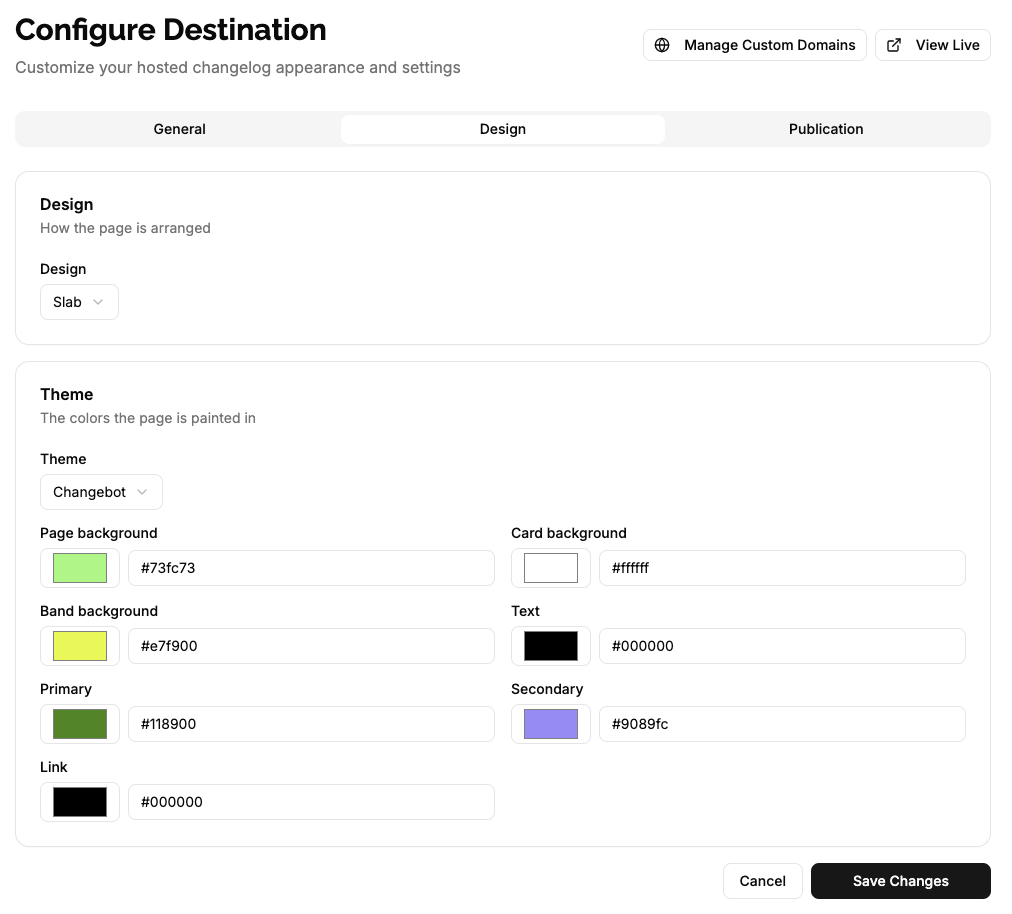
The new themes are seven-color palettes (background, card, band, text, primary, secondary, link) that you can apply to any changelog design. Previously, changelogs only supported a single primary color which had a very limited effect on the page. By expanding to seven configurable colors and separating design from palette, teams can truly customize the look of their hosted changelogs and mix-and-match palettes with different layouts and components.
- What you can do now:
- Mix and match: apply any color palette to any design so branding and layout are independent.
- Richer theming: move from 1 color to a full 7-color palette for deeper styling.
- Accurate previews: the theme preview matches the live page and automatically picks light or dark where appropriate.
- Edit and extend: override the built-in themes and save your edits as team themes.
- System themes: we ship two system themes today — Default and Default Dark — which you can override to create custom themes. More system themes will be released soon.
These changes make it faster and safer to update your brand across all hosted changelogs — swap palettes, tweak a design, and the rest follows automatically.